Published
- 3 min read
Using Kubernetes Service for Network Address Translation (NAT)
The other day I came across a service called ngrok. This is such a great tool in which it allows me to work around my CGNAT (Carrier-grade NAT) problem at home.
First challenge with CGNAT
My current home internet connection is through a 5G Home Broadband and the way the ISP handles 5G is different to many traditional broadband connections. Not only I do not have a static public IP, my public IP address is not even publicly reachable due to CGNAT.
Now thanks to ngrok, I can easily do a reverse proxy via their service and now I can access my local resources at home while I am away.
Second challenge with the free service
ngrok has made it super simple to start the proxy, all I needed to do is run the command to setup my configuration like:
$ ngrok config add-authtoken <enter-token-code-once-registered>Once the config file is created, then I can expose my network port such as SSH by running:
Note**:** I do not intent to open SSH publicly. This is purely for this blog post demo only.
$ ngrok tcp 22 --region auOutput:
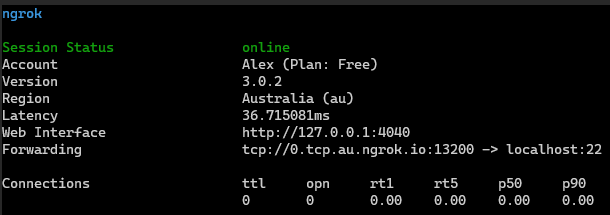
To now if I want to connect to this service, I can point to the forwarding address above. Example:
       $ ssh -p 13200 -l centos 0.tcp.au.ngrok.io
The authenticity of host '[0.tcp.au.ngrok.io]:13200 ([13.238.xx.yy]:13200)' can't be established.
ECDSA key fingerprint is SHA256:f1FULFpxxxxx.
Are you sure you want to continue connecting (yes/no/[fingerprint])? yes
Warning: Permanently added '[0.tcp.au.ngrok.io]:13200,[13.238.xx.yy]:13200' (ECDSA) to the list of known hosts.
[email protected]'s password:
Last login: Tue Apr 26 19:58:14 2022 from localhost
[centos@centos7-9 ~]$
The problem
While the above works flawlessly, the problem I have is whenever I re-run ngrok, the forwarding address changes. For example, after the re-run, the forwarding address port is now 11313 instead of the initial port 13200.
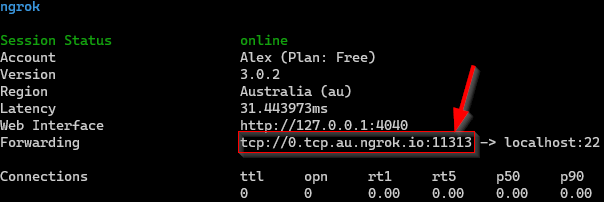
ngrok do have a feature to configure static TCP addresses, however this only applies to the paid versions.
My solution
Since the paid version cost almost the same as what I pay for the services I host on AWS, I thought why don’t I use Kubernetes service to NAT my connection over to ngrok instead?
So I’ve tested it by applying the following manifest:
       ---
apiVersion: v1
kind: Service
metadata:
  name: ngrok-service
spec:
  type: NodePort
  ports:
  - protocol: TCP
    port: 30000
    nodePort: 30000    # This port is publicly reachable on my worker node

---
apiVersion: v1
kind: Endpoints
metadata:
  name: ngrok-service
subsets:
  - addresses:
    - ip: 3.24.145.55  # ngrok IP from DNS by checking "0.tcp.au.ngrok.io"
    ports:
    - port: 11313      # Port generated from "ngrok tcp" command
Now let’s test the Network Address Translation (NAT) through my Kubernetes service!
       $ ssh -p 30000 [email protected]
[email protected]'s password:
Last login: Tue Apr 26 20:17:14 2022 from localhost
[centos@centos7-9 ~]$
It works! but I still have the problem of keeping this manifest updated each time I re-run ngrok.
Next steps
Now that I know my Kubernetes cluster is able to help me do the NAT into ngrok, all I need to do now is automate this part!
The great thing about ngrok is that they also provide an API endpoint to allow me to fetch this data. For example:
       $ curl -s \
  -H "Authorization: Bearer <my-api-token>" \
  -H "Ngrok-Version: 2" \
  https://api.ngrok.com/tunnels | jq -r '.tunnels[0].public_url'
tcp://0.tcp.au.ngrok.io:11313
From here I will be writing my own Python script to check if I can reach lexdsolutions.com:30000 and if not then it will call on the ngrok API to get the new public URL and will automatically update the Kubernetes service for me.
Conclusion
This is by far not the greatest solution.. the free offering do have many other limitations such as limited TCP connections and bandwidth, however for what my small home project is needed, this will do for now.